Author: Felipe Bahiense

  • Why Fusion Platform is the best option in Information Management.

    Why Fusion Platform is the best option in Information Management.

    Thinking about adopting software in a business can often lead to something complicated. They require time, a specialized team for implementation, not to mention the adaptation of the team to the new routines.

    But in a scenario where managers must make increasingly assertive decisions and comply with legislation and company standards, these first steps end up being small details in the face of the benefits of a well-planned implementation with an adequate solution.

    And as we mentioned on another occasion here on the blog, we are in the era of Digital Transformation, with a lot of data to be managed in organizations.

    And does your company know what to consider when adopting an Information Management solution? And if you have already adopted it, does this tool meet the needs of the business and has features and features that make everyday life easier?

    6 reasons to choose Fusion Platform

    There are several demands of an organization, among the main ones are process management, document management and capture, in addition to the analysis of business indicators.

    End-to-end, learn why Fusion Platform is the best option for your business when compared to other management tools available on the market.

    1. Simplified Process Modeling

    It is common for other systems to rely on platforms and system development when designing processes, business rules, and forms. Workflow engines are usually limited and with low adherence to processes, with more complex business needs. That is, if you don’t have technical knowledge, you’ll need professionals in the area of information technology. And this requires time and high investment in development.

    Another problem in these systems is the documentation of processes. With editing dependency on office tools, there is no guarantee that the changes made will generate an updated version of the documentation.

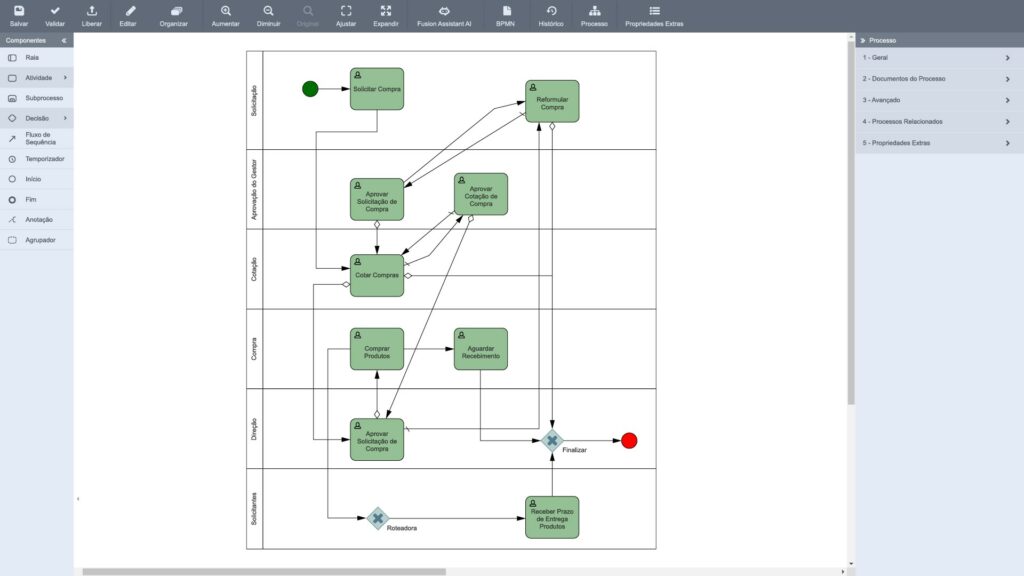
    In Fusion Platform, the design of processes and business rules can be carried out by any business professional through 100% graphical tools. This facilitates the adoption of the culture of continuous improvement and ensures the evolution of the company’s processes, without the need for development (programming). Not to mention that the BPM Engine is prepared to automate any type of process, regardless of the complexity and conditions of the business.

    Regarding the documentation of the processes, in Fusion it is done automatically, as well as its uptades. Whenever there is a need to export it, it is possible to do it in a few clicks in any version.

    2. Forms

    Other tools require platform-specific development and are developer-oriented. They also do not have form and reuse templates, in addition to not supporting multi-languages.

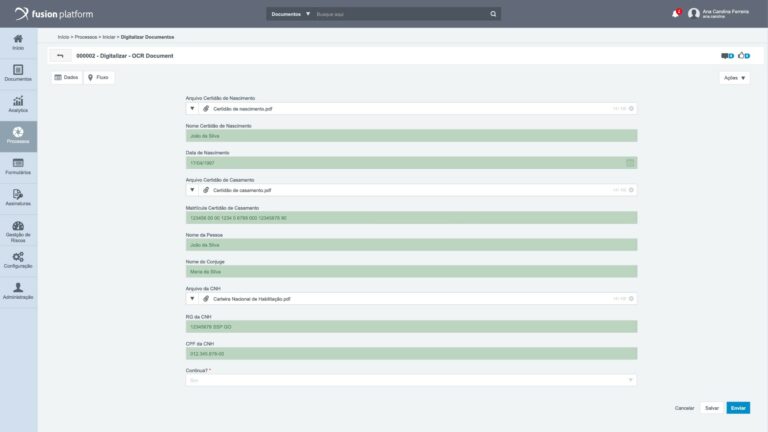
    In Fusion, forms can be used and managed by business users, and you can create forms that can be repurposed between processes. Not to mention that they are natively responsive to web & mobile and multi-language platforms, with integration without the need for development through database, SOAP, webservices…

    3. Integration with other systems

    Due to the need for iT professionals, integration with different systems in other software has a high level of complexity, development and customization.

    In Fusion, you integrate any database through native features, in addition to having the possibility of integration configuration by business professionals.

    4. Task Organization (Task Center)

    In a Task Center of other software, the difficulty already starts from the search feature, in which it is possible to make queries only through filters and without the possibility of ordering processes by their status.

    How is the organization of tasks in these tools:

    • There is no mechanism for this;
    • The backlog is simple and pagination-based;
    • They do not have a summary in the pending issues or markers for identification;
    • Nor is there any quick actions functionally
    • And if you need to manage other activity boxes of an employee, for example, these solutions do not have a sharing and viewing feature by a manager.
    • On the other hand, in the Fusion Task Center, access to pending issues is easy, since the list is presented in a fluid way in the standard timeline and there is an indexed search of processes with advanced filtering and sorting features.
    • The summary associated with the related task also optimizes access, with the help of sorting and bookmarking features. There are also quick actions that facilitate decision-making from buttons in email, or swipe mobile, without the user having to open the entire form structure.
    • Managers also have access to manage the box of other employees, through the sharing and viewing feature. Which does not happen in other tools.

    5. Analysis of indicators

    If you need to analyze indicators, your company can become hostage to other systems and have a low performance in a scenario with a higher volume of data. In these cases, it is necessary to have knowledge in SQL and XML language to manage them, not to mention the difficulty of configuring different levels of permissions for viewing and managing indicators.

    In Fusion, there is support for large volumes of data through the Star model, and with the user experience designed for employees in the business areas. These are simple configurations that only require knowledge in SQL.

    Management is centralized, with the possibility of controlling permissions. There is also the ease of modeling indicators, filters and hierarchies just by selecting the origin of the cube.

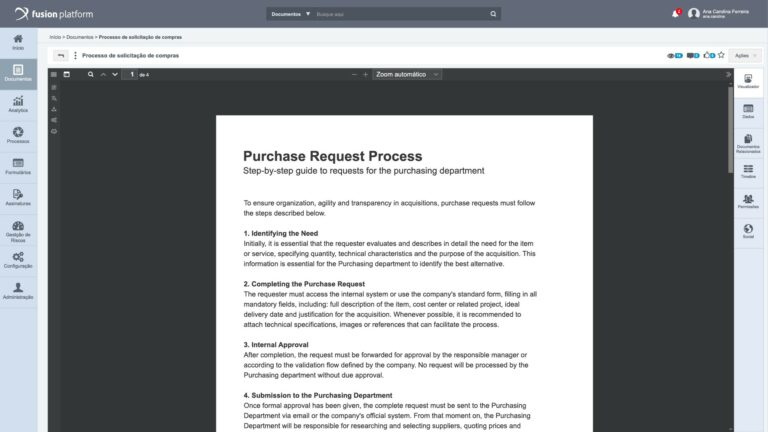
    6. Document management and digitization

    It is common to find solutions on the market that are only focused on process management or only on document management, and that cause headaches when integrated. Not to mention that these “solutions” do not follow the CONARQ document typologies and do not allow the configuration of expiration of documents by typology, as well as the creation of dynamic metadata.

    But unlike these, Fusion Platform allows you to easily integrate document management with BPM, as well as create and use processes for any document-related event (starting a process by sending for approval, canceling a document, issuing as controlled copy, expiring the document, among others).

    The user can also create dynamic metadata and define the lifecycle of corporate records according to the document type, according to the CONARQ standard.

    Still not enough? Learn more reasons”

    The Fusion Platform:

    • 100% prepared for Android and iOS mobile devices;
    • Compatibility in the evolution of tool versions;
    • Minimal vendor lock-in;
    • User authentication through Multiple ADs/LDAP’s, CAS/SAML;
    • Cloud, On-Premise or Hybrid licensing model

    If you go on the wave of other tools… Your business may be limited to:

    • Mobility only superficial, with basic functionalities;
    • Backward compatibility with non-existent or very complex versions;
    • Almost total dependence on the supplier;
    • Only a single AD/LDAP, with no CAS or SAML support and;
    • On-premise licensing models only.

    The value of information

    When we talk about information, it is necessary to keep in mind that it has great value for a corporation, when organized and well structured.

    Commonly, information is also referred to as corporate assets, which are nothing more than those that contribute, even indirectly, to future cash flows.

    This is also mentioned by Association for Information and Image Management (AIIM), which says that information sharing aids the use and exploitation of corporate knowledge.

    This principle must be recognized or agreed upon by the entire organization, otherwise any business case and support for IM (Information Management) will be weak.

    We’ve already covered all the reasons why Fusion Platform is the best information management platform for your business. And will your company be left behind in this context of change?

    Try it for 15 days free now! Or, if you prefer, request a demo from our consultants. Count on us to answer all your questions!

  • What are you waiting for to have a paperless company?

    What are you waiting for to have a paperless company?

    If you follow articles from AIIM (Association for Intelligent Information Management) you may have come across the term “paperless company” a few times. Because we understand the importance of the subject, in the post Paperless: what it is and how to take the first steps, we made a general overview of the paperless environment.

    On the occasion, we commented on the reasons for having a paperless company and how you can start the transformation in your area and organization as a whole. In this new article I want to complement the topic a little more and bring more ideas to help your business reduce – and maybe eliminate – the use of paper.

    But, before starting, I will propose a discussion:

    What prevents transformation to a paperless company?

    Instead of talking about the reasons for making the transition to a paperless company, I’ll take a slightly different approach. The reason is simple: for many people, it is impossible to think of a life without paper.

    Psychology explains this with the term “haptic perception”. The word “haptic” comes from Greek and means “relative to touch”. Currently, the term designates the science of touch, which is what happens when you touch the screen of your smartphone to give a command.

    When we talk about paper, many individuals like the way it makes them feel, as it brings a feeling that because it is a physical item, it is something real. For many people, information inside a computer or in the cloud doesn’t seem so real because it’s not so palpable.

    This perception of the real x unreal happens at an unconscious level, and in many of us it is a belief that we do not even know we have. But the fact is that, according to haptic perception, we need to feel with touch to assimilate that such a document exists or that such a contract has really been signed.

    Leaving the field of psychology, a very big barrier to transformation into a paperless company is the simple question “how?”. Every change requires efforts and I understand that it is at this point that the barrier can be great.

    Transitioning to a paperless business requires discipline and more work, especially at the beginning. For example:

    • Who will scan existing physical documents?
    • Where will they be stored?
    • How to ensure document security?
    • Who will have access to them?
    • How will the documents be signed?
    • Will the documents have legal validity?
    • How will these documents be managed?

    These are just some of the questions that may arise and that can be an obstacle to the transformation into a paperless company. In order to show you that there are answers and solutions to each of your questions, check it out below.

    Step by step for a paperless company

    Change is hard. The first point you need to keep in mind is that the example must come from above. It’s no use for a manager with his own physical document archive to want to demand a paperless environment, right?

    And for the change to make sense, it is important to present to everyone in the organization the advantages of a paperless company. About the positive aspects, you can talk about:

    • Productivity gain
    • Improved efficiency
    • Increased security
    • Environmental issues
    • Corporate Governance
    • Cost reduction

    In the article Paperless: what it is and how to take the first steps towards the paperless era. We present more details on each point.

    Once everyone understands the importance of paper reduction (and future elimination), we can move on with the steps.

    Set goals

    Everyone knows where they should go, which is the transformation to a paperless company. So that efforts are directed and the goal is not lost along the way, set goals.

    You can, for example, set goals for each department and for the company as a whole, encouraging all employees, at different hierarchical levels, to make the transition. In order to achieve this, you can create some sort of reward for when the goal is achieved.

    Whether with a reward or without, the important thing is for everyone to understand the goal and the deadline to achieve it.

    Make an overview of the impressions

    What is each area printing? What do I need to print? Are all prints really essential?

    The answers to these questions may show that several impressions are unnecessary. For example, many people have the habit of printing emails to take a certain agenda to a meeting.

    Nowadays we have cloud applications that allow you to share information in a very secure way, such as Google Docs, Evernote, and Dropbox.

    Digitize what’s important

    Each department made an evaluation of the printed documents. Those that can be discarded should literally go to waste. The others need to be digitized.

    At this stage, the “heavier” work begins, because for some sectors the amount of documents is much greater, such as the administrative, financial and HR of a company, for example.

    Create a digitalization strategy

    Initially, by “strategy” I mean “habit”. Once the necessary documents have been scanned, keep in mind that this will be the procedure to follow at all times.

    After that, think about the strategy itself. Here I like to talk about processes, because they are what move our companies. Imagine the following: who should read the scanned document? Will it be necessary to take any action, such as signing it electronically? What is the purpose of the document? Is there any action triggered from it?

    To exemplify, here at Neomind, before we were a paperless company, a simple travel expense report needed on average – between printing and copies of invoices – three copies of 30 pages each. All this control was necessary so that we could reimburse expenses.

    By eliminating paper, we created a process in which the requester fills in all the information in one system (the Fusion Platform). This information goes to the financial department that makes the check and posts the payment. The process is simple, but notice that it occurred in stages (that is, through a process), the last of which is the payment of expenses itself.

    So, when creating the habit of digitizing, also think about activities that must exist for the document to follow a flow. This brings us to the final step:

    Automatize

    Automation is not necessarily a step that happens after another. Ideally, the paperless company should be automated at the beginning of this transformation (at the goal setting stage).

    It is important to clarify that when I talk about automation I refer to document management. For you to understand: an EDM (Eletronic Document Management) software  allows the user to publish and control documents securely and much more accurately than they would do manually with printed materials. What’s more, all this in one place (which means that documents will not be scattered in drawers, files and employees’ desks).

    In addition, an EDM application allows you to configure approval flows for each document, as well as security settings (who can view and edit it? Who will be allowed to delete it?). Also, software keeps all actions recorded, which means that no user can change or delete a document without anyone knowing about what happened.

    Finally, every paperless company needs to ensure that documents are stored legally and with legal validity, and this is also a characteristic of good EDM systems.

    Concluding

    Once you’ve completed the paperless step-by-step guide and seen how it works in practice, you’ll realize that with time and cost savings – as well as improved document security – your employees, customers, and the company as a whole will benefit from the change.

    Many organizations already know how heavy it is to have to store and control piles of documents. However, there are few that really make a greater effort in this direction. Observing digital transformation trends, we have seen that the elimination of paper is among them.

    Will your company be left behind or will it take action? To continue the discussion, we recommend reading the text: What Document Management does for your company: from workflow organization to paperless environment.

    How about starting digital transformation now? Get to know Fusion here.

    Did you like the article? Leave a comment telling us what you think. We hope it has been helpful to you, and if so, please share it with your colleagues. Also, don’t forget: keep an eye on Neomind’s Blog and follow our content.

  • Why automate documents using ECM?

    Why automate documents using ECM?

    The amount of data that flows through an organization is large and, precisely for this reason, managing it requires an effective method. If you stop for a moment to think about it, it’s the proposals, contracts, invoices, and sales orders that show that your business is working.

    To handle so much information circulating, whatever the sector in which your company or industry operates, automating documents will ensure that it has a system that centralizes data. This will make it easier to create, approve, and distribute all documents. In other words, automation is what will keep your business thriving.

    But if you are still not convinced, or if you need to understand a little more what we mean, we have listed some benefits that your organization will have by automating documents:

    1 – Time optimization

    Without doubt, time is our most precious resource. Why sacrifice it by having to manage documents manually? If we look at some departments in particular, such as finance, what is the number of hours lost by professionals because they have to enter data by hand?

    Since finances are important to the company and good governance requires transparency in information, until all the paperwork is finished, all the other tasks that professionals in the field need to perform are put on the back burner.

    We gave the example of the financial area, but the same can be applied to all other departments of an organization. When document management us automated and everything follows a process, employees are free to focus on important tasks.

    Instead of wasting time on details like chasing a signature, they can invest their time in global projects that will bring better results. Instead of reviewing cash flow statements, they can execute orders. Instead of knowing where a business proposal is, they can communicate with customers and create lasting relationships.

    No matter how your teams invest the extra time that document automation enables, the fact is that there are coutless tasks in an organization that are far more valuable than manual data entry.

    2 – Ensuring compliance

    Often overlooked, compliance is an indispensable componet of operational efficiency. Your team may be more productive or more effective and efficient than your competitors, but if your documents aren’t adequate, everyone’s hard work becomes unnecessary.

    To ensure that the organization is in compliance with the regulations of its segment, standards and controls must be created ranging from codes conduct to procedures, norms and policies.

    Systems for automating documents make it easier to meet compliance requirements by creating standards for documents, establishing access and editing controls, and distributing them as needed.

    3 – Management of the entire life cycle

    Every document has a life cycle. Think, for example of contract management. It starts with the request and ends with the signature. Along the way, there are other steps to follow.

    Automating documents means that they will follow a workflow defined by your company. This flow is all determined within a process, which automatically ends an activity as soon as it is completed, and sends it to the person responsible for the next step.

    In practice, this means that no physical document will pass from hand to hand, or no information will be lost in the middle of emals. Or, even, it means that never again will a certificate of power of attorney have its expiration date expired and will take everyone by surprise.

    These are seemingly small details, but they will make the organization much more productive, transparent in relationships with employees, customers, and suppliers, and (once again) always be able to comply with the standards of its sector.

    4 – Guarantee of accuracy

    A wrong comma on an invoice, or a sales order with a zero less can do immense damage to the company. Imagine you send a proposal to a costumer and then realize that the version sent to him was not the last. It will be a loss of credibility for sure, do you agree?

    A typo or outdated information is what can happen in cases where data entries in documents are done manually. When a slip like this occurs, no one likes it, of course, but as we are human and most of the time overloaded with things to do, mistakes happen.

    However, this cannot be an excuse for your organization to let slips pass, let alone accept mistakes. By automating documents, data is entered automatically and correctly, giving the entire company the peace of mind that the information is accurate and that the version being worked on is the last.

    5 – Increased collaboration

    A person in your company is waiting for a customer’s data to generate the contract. The other waits for the contract itself to send to the customer. In turn, the customer is waiting for the subscription. In this case, we again have lost time for everyone.

    By automating documents, tasks are completed faster and more efficiently. This is because some activities do not depend on others to start, and when there is dependence, the automation system itself sends notifications to the person responsible for performing the task. And whenever an activity is being carried out efficiently, the company’s revenue grows.

    Collaboration is super important in the creation of many documents in an organization, since depending on the case, several areas are responsible for creating them. As through a system for automating documents, collaboration is a benefit, several authorized people can work on the same document, and everything that is done on it can be easily tracked.

    So, how to automate documents?

    So far you have understood some of the benefits of document automation. But now you need to know to do it.

    The answer lies in the document management system. ECM (Enterprise Content Management) software is not just a technology or a methodology.

    As the AIIM (Association for Information and Image Management) says, ECM is a “dynamic combination of strategies, methods, and tools used to capture, manage, store, preserve, and deliver information that supports key organizational processes throughout thier lifecycle.”

    Therefore, to automate documents, your company will need and ECM solution. In order for you to understand well what Enterprise Content Management is and the advantages for your company, we recommend reading the ebook What is ECM? All about Enterprise Content Management.

    And if you have any questions about what has been covered in this article, visit our website and contact us. It will be a pleasure to talk to you! If this post was helpful, please share it on your networks.

  • 4 Reasons to opt for and integrated management platform

    4 Reasons to opt for and integrated management platform

    An Integrated Management Platform is a tool that unifies the control of processes, documents, and indicators.

    The dynamism of the market and the plethora of new technologies require businesses to know where and when to invest in new solutions. Managers who need to monitor and optimize their processes, track results, develop precise strategies and make assertive decisions, find in integrated management the ideal partner.

    With a focus on enabling a holistic view, these platforms enable end-to-end management. In this way, all the company’s activities have a common goal as their purpose.

    By enabling more efficient and transparent communication, this solution generates benefits for the entire company, boosting profitability.

    Ready to know the top 4 reasons to opt for an integrated management platform?

    What is integrated management?

    Integrated management is a methodology in which all the company’s management is carried out jointly and centrally. This alternative provides a broader and more complete view of all areas and their processes.

    By unifying the information, it is easier to understand how the current scenario is, and the total performance of the company. Thus, decisions are more assertive and focus on optimizing the workflow.

    Luckily, there is currently software that helps in the execution of integrated management. An Integrated Management Platform is capable of incorporating several functions and applications into a single structure. Process data, documents, and indicators are unified and quickly acessible in one place.

    Because of the integration, it prevents departments from using separate or disconnected platforms to carry out specific activities.

    With everything grouped together, data and statistics are synchronized and updated in real time. This factor helps in conducting efforts, meeting goals, and achieving the objectives set.

    Why choose and Integrated Management Platform for your business?

    Small, medium and large companies have the mission of improving the execution of their tasks with proper use of resources.

    This concern goes far beyond production inputs, mainly covering the time spent carrying out the flow of activity.

    The digital transformation obtained by implementing and Integrated Management Platform is immense and generates numerous benefits. Check out 4 main reasons to opt for this tool:.

    1. Standardization and Automation of processes

    Adopting an integrated management platform requires in-depth study and mapping of how processes are currently executed.

    By providing and amplified view where all areas of the company work in a connected way, it becomes simpler to control the steps of the processes.

    Even if it doesn’t seem like it, and activity in one area may be being hampered by the delay of another related department.

    Some processes, such as procurement, involve more than one sector, and when there is no connection between the parts, the whole is harmed.

    By standardizing processes, all integrated parties know what activities suit them and how they should be performed. Adopting standards makes it possible to align objectives and eliminate redundancies and inefficiencies, reducing bottlenecks.

    With standardization, activities can be automated so that execution is even more controlled, simple, and fast.

    2. Increase productivity

    Time-consuming and complex processes are streamlined with the use of and integrated management platform. The centralization of data, information, and functions avoids the need to change of migrate between software to analyze or perform certain activities.

    In addition, the unification means that information is not lost by the exchange of e-mails, phone calls and other means of communication used.

    When the platform has an electronic signature, document management becomes more improved and secure.

    The centralization provided by this platform enhances work, agility of execution, and communication between teams and departments.

    Anchieving greater productivity requires that the integrated management system is in accordance with the needs and demands of your business.

    There needs to be freedom to modify and customize the functions according to your objectives and goals. In this way, the solution will provide more positive effects for the company.

    3. Centralized and Trusted Information

    As the company starts to execute its processes in a single system, with the possibility of integration with existing resources, all information is gathered and stored in just one place.

    This facility provides synchronization and uptading in real time. In addition to agility, mobility and speed of access, the data is reliable and reflects the company’s situation in a given period.

    Another important issue is the simplified analysis of data. Because they are not dispersed, the tool itself can collect indicators and prepare periodic monitoring reports.

    4. Quick and assertive decision-making

    A management system provides greater control of the company’s data and performance. This information can be presented intuitively in relevant reports.

    When decisions are based on real data, they become more assertive. And, it serves as a basis for anticipating changes or inclement weather that may impact the business.

    Depending on the functions of the solution, the reports can bring performance indicators and comparisons by periods, pointing out evolutions and workflows that must be improved.

    As uptades are constant, decisions area faster and with minimized risks. Confidence in data makes it possible to create cause-and-effect scenarios that make the decision clearer and more objective.

    Which integrated management system to choose for your business?

    The answer to this question is quite simple, the best integrated management platform is the one that meets your demands.

    In this way, assess the needs of the business, check out a checklist and understand the differentials between the systems.

    A very relevant question is whether the tool allows easy customization and guarantees training to internal professionals. Also check the implementation time and evaluate the cost-benefit of the investment.

    Take advantage of opportunities to condut usability testing, such as trying out Fusion Platform in your reality.

    Fusion is an integrated management platform that enables true digital transformation. Managing processes, documents and indicators, the solution is user-friendly, has mobility, usability, integration with systems and native electronic signature.

    Check these and other reasons that justify the use and adoption of an Integrated Management Platform.

  • The Importance of Empathy with Users During Process Changes

    The Importance of Empathy with Users During Process Changes

    Process change is a transformation that, although it brings positive results and enhances performance, directly affects users.

    Humans are often resistant to change. In fact, the unknown can be intimidating for some people. When it involves changes in an important area of life such as work the impact tends to be even greater.

    At these times, having the ability to put yourself in someone else’s shoes, to understand their emotions and expectations, is essential.

    Given its importance, let’s explore how to practice empathy with users during process changes.

    Why is Empathy so important in Process Change?

    In general, empathy is a tool that strengthens relationships between people. Of course, this only happens when the feeling is genuine and sincere.

    When a company seeks to implement a process change, it must pay special attention and include users throughout the entire execution.

    Naturally, the decision to change comes from management, with the goal of achieving certain objectives such as better results, increased productivity, or optimization.

    However, these modifications must be clearly explained and understood by users emphasizing, above all, the benefits these transformations will bring to the way work is carried out.

    By including users in the implementation process, communication becomes more effective, and their opinions are validated. In addition, participation encourages familiarity with new tools.

    Another important aspect is that empathy allows for a deeper understanding of the user. This helps identify requirements or potential challenges that could impact the process change.

    Understanding users’ concerns makes it possible to implement adjustments that ensure successful implementation plans.

    For example, when implementing a process management solution, both the mapping and creation of a new workflow become more accurate and coherent with user participation.

    This makes sense because users are the ones performing these activities daily they can best describe the logic, detailed steps, and points that need improvement, such as where to add decision points, remove irrelevant tasks, or define responsibilities.

    Developing Empathy

    Having empathy for users during process change eliminates assumptions and encourages collaborative work.

    To develop empathy, it’s important to understand that there are three main types:

    • Reflective empathy: A response to another person’s emotions and motivations.
    • Emotional empathy: Understanding and acting according to others’ feelings.
    • Congnitive empathy: The most complex but also the most important this involves the ability to assume and understand another person’s perspective based on their experiences.

    Undoubtedly, cognitive empathy is the one that needs to be developed in order to understand how users will react to changes. It also enables more accurate and effective process modeling.

    Focusing on Congnitive Empathy

    Some simple actions can help strengthen cognitive empathy:

    • Be patient: What the user perceives as a problem might not be, from your perspective. Be patient, explain carefully, and stay open to understanding their concerns.
    • Engage directly: Observe and interact with the user in their work environment. Take on the mindset of a new colleague it becomes easier to understand how users behave and what their goals are.
    • Create scenarios: Observation can sometimes feel intimidating. To understand the user’s daily reality, recreate situations similar to those they face, acting as a newcomer would.
    • Consider impacts before implementation: Every process change must meet user needs. Analyze in detail how modifications will affect their daily activities.
    • Avoid judgment: Practice active listening and stay genuinely open and interested in what users have to say.

    Of course, empathy is a way to get closer to users’ needs. While no one can fully grasp the user’s perspective, taking practical steps to replicate their conditions and experiences helps you better understand their day-to-day reality.

    Practical ways to apply empathy

    The first step is to get to know your users, their perspectives, and the organizational environment they operate in.

    By understanding users, you can uncover issues that might otherwise go unnoticed. Different viewpoints often lead to new ideas for improving and optimizing processes.

    When it comes to interaction, interviews can be very useful but the questions must be clear and objective.
    Prepare the questionnaire in advance to capture essential information directly, and keep questions open-ended to allow for deeper responses.

    Another empathetic practice is mirroring that is, repeating what the user said in your own words to confirm your understanding. Mirroring helps strengthen connection, improve communication clarity, and reduce resistance to change.

    If you can’t observe users directly during the process change, ask them to describe their experience in detail. Nowadays, you can also request videos or photos of their workflow.

    Using analogies or examples from other departments or teams also builds empathy. When users learn that others have faced similar changes, positive comparisons can foster encouragement and confidence.

    Implementing new technologies during process change

    Process change, in particular, requires a partner who is ready to communicate and truly understand users.
    With the help of experienced consultants, cognitive empathy can be deepened especially through training sessions that explain new tools in a clear and straightforward way.

    It’s up to the company to choose the solution that best meets its needs without forgetting to consider how easily users can adapt to the new system.

    At Neomind, we are constantly improving and updating the Fusion Platform to better meet users’ needs in a personalized way.

    The Fusion Platform is fully intuitive a low-code tool that allows each user to adapt it according to their own requirements.

  • Process maturity: how to achieve

    Process maturity: how to achieve

    Process maturity consists of analyzing the degree of evolution and the organization’s ability to manage and improve internal processes efficiently.

    Companies of the most varied branches and sizes have different levels of maturity in their daily routines. High performance is directly associated with guiding the development of a much more optimized flow.

    Highly developed processes are the foundation for growth and operational excellence. The higher the level, the greater the benefits brought into the organization.

    Investing in process maturity is strategic for both the current moment and the future of the organization. Let’s learn more about the subject?

    What is process maturity?

    This is a measure to assess how well business processes are defined and controlled within the company. It can be done either individually, a single process, or a general analysis of an entire sector or company.

    Processes are activities performed in order to achieve the organization’s objectives. They are logical sequences and routines, standardized, repeated and executed daily.

    From a management point of view, maturity is an indicator that represents how much this flow is defined, managed, and measured. For you to understand better, process maturity levels are like a ladder that the organization climbs to reach new levels of efficiency.

    In this sense, it is possible to understand that a higher level corresponds to lower risks, better results, a higher level of rapport, efficiency, and so on.

    We say that a process has reached a good level of maturity when:

    • its stages clearly delineated, inputs produce the same outputs;
    • the rates of communication failures and delays are very low;
    • process is documented and employees know where the relevant information is;
    • the possible steps and tasks are automated;
    • the expected results are consistently achieved.

    In other words, a high level of maturity presents processes that are mapped, standardized, analyzed, managed, and constantly improved.

    Why is it so important?

    In short, process maturity is important for a company to continue growing in the face of a competitive, constantly changing market with increasingly demanding consumers.

    This analysis serves as a guide to understand the journey so far, and where to go.

    Another important point is that this level of evaluation does not only refer to the documentation, control and auditing of processes, but how they are understood and used by the people involved.

    Process maturity levels

    As explained, process maturity is a kind of evolutionary ladder where each step corresponds to the goals that need to be achieved.

    There are currently some evaluation models. Therefore, the name and number of steps can be variable. But, in general, they refer to:

    • Level 1: Initial or chaotic: here the focus on processes is minimal. Team members perfom activities differently, the flow is not defined and documented. It is common when processes are not the daily focus, and go unnoticed;
    • Level 2: Repeatable: at this stage there is already standardization with predictable and repeatable outputs. However, process knowledge is still centralized in one or a few people;
    • Level 3: Defined: Processes are defined and documents with a standard operating procedure. There are already opportunities for improvements in efficiency and effectiveness. Knowledge is decentralized and cooperation between teams in thriving;
    • Level 4: Managed: This level is known as measured. That is, there are metrics, control and analysis of processes to identify and address areas of opportunity;
    • Level 5: Optimized: The highest and most advanced level. Here the company strives for continuos improvement of efficiency and effectiveness through incremental innovations. Process management is a reference for other companies in the same segment.

    Advancing in maturity levels

    Advancing from one level to the next requires awareness of activity flows. Going from the initial to the repeatable level consists of repeating the activities so that there are consistent results.

    To advance to the defined level, it is necessary to document the steps of the activities by creating a standard operating procedure template. Then, a person with no knowledge of the process should be asked to execute it based on these instructions and evaluate whether they obtained the same results.

    To reach level 4, implement metrics to quantitatively understand process performance. Here it is important to adopt solutions and technologies to automate the flow and obtain data and information about the processes.

    Now, reaching the highest level of process maturity consists of diagnosing and addressing opportunities to extract the highest level of efficiency.

    How to reach the highest level of maturity

    Achieving the highest level of process maturity involves implementing strategies such as applying process management, with BPM.

    Business Process Management involves the collection and analysis of data about processes so that management is no longer intuitive and decisions are based on numbers and real data.

    In this sense, achieving a high level of maturity consists of adopting in-depth analyses of how routines are structured.

    In other words, it requires exquisite management. The Fusion Platform is a complete solution for process management, providing mapping of activities, standardizing, automating and monitoring the company’s entire routine.

    With centralized data and real-time monitoring of process execution, it is much easier to identify failures and opportunities for improvement. Thus, the escalation of maturity levels happens in an accelerated and staggered manner.

    In general, to level up, focus on:

    • Mapping: identify all the organization’s processes and their workflows;
    • Documentation: create flowcharts and detailed descriptions of each step;
    • Standardization: estabilish standards and procedures to ensure uniformity;
    • Performance indicators: define metrics to monitor the performance of processes;
    • Monitor and analyze processes: observe performance, collet data, and identify opportunities for improvement;
    • Automate processes: all activities that can be automated. For this, process management tools must be implemented;
    • Promote a culture of continuos improvement: analyze reports, initiatives and encourage the participation of all those involved;
    • Invest in training: train employees to execute processes in a standardized and efficient way.

    Now that you know all this, do you want to take your processes to a new level? Try Fusion Platform and transform your business management.

  • TCO (Total Cost of Ownership): What It Is and How to Calculate It

    TCO (Total Cost of Ownership): What It Is and How to Calculate It

    TCO stands for Total Cost of Ownership, which is a formula designed to calculate the total cost of an asset, product, or service. This tool optimizes financial investments by considering not only the acquisition price we paid for something, but also all other associated costs throughout its lifecycle, including maintenance, upgrades, training, and more.

    For instance, think about the costs related to a process management platform. You’ll need to factor in implementation, operation, and maintenance costs throughout the software’s entire lifespan. The sum of all these costs represents the TCO, reflecting the total value invested from purchase to disposal.

    Understanding the total cost of ownership and learning how to calculate it efficiently is a great way for your business save money and increase overall efficiency.

    What Is TCO?

    TCO is a calculation performed to estimate the total expenses associated with a particular asset. It measures all money spent on acquisition, implementation, use, and disposal or discontinuation of a product or equipment. Its purpose is to provide a comprehensive view of any given asset and its value over time, serving as a basis for comparing costs and return on investment (ROI).

    TCO can be calculated by summing the initial purchase price and the operating costs over the asset’s entire lifespan. For businesses, TCO does not just focus on short-term costs but emphasizes long-term value. The lower the total cost of ownership, the better the asset’s value over time.

    This calculation is crucial for all business strategies, such as choosing suppliers and allocating resources to optimize processes. It also provides evidence to compare alternatives and facilitate negotiations, like discounts or additional benefits.

    What Should Be Included in TCO Calculation?

    Several factors should be included in the total cost of ownership calculation, encompassing both direct and indirect expenses. Even intangible assets can be assigned a value to be included in the calculation. In summary, all costs and expenses incurred from purchase to disposal need to be considered.

    When discussing a process management platform, for example, numerous benefits are gained throughout its lifespan, particularly in productivity, performance, and value engineering. The acquisition of such resources should include costs for implementation, training, customization, maintenance, operation, integrations, licenses, and more.

    To calculate TCO accurately, consider the costs of necessary machinery for the software to function, along with internet, electricity, downtime, and other related expenses. Only after gathering all this data and performing the calculations will you be able to determine if the investment will provide sufficient benefits to justify the purchase.

    Calculating Total Cost of Ownership

    The calculation involves summing all related costs over a specified period. The formula would be:

    TCO = acquisition cost + (sum of all related costs and expenses x years of useful life).

    If the item can be resold later, the potential resale value should be subtracted from the final TCO.

    For illustration, let’s consider a process management platform with the following average values:

    • Initial implementation cost: $10,000
    • Training: $350
    • Customization: $3,500
    • Cloud storage: $2,500

    So if this platform version’s lifespan is 5 years, the total cost of ownership would be:

    TCO = $10,000 + ($6,350 x 5 years) 

    TCO = $49,250, or an annual cost of $8,350.

    There are some challenges in calculating TCO, such as difficulties in defining standards and the scope of operational costs, especially when it comes to elements that may be overlooked, like training or depreciation.

    Another consideration is the volatility of supplies or parts that may be needed. It’s nearly impossible to predict what may be required or the future prices of these supplies. Additionally, the cost of updates, particularly regarding technology and software, should not be overlooked, as a vendor may discontinue a service or cancel a feature, potentially raising the TCO significantly beyond initial estimates.

    Acquiring a Process Management Platform

    Adopting a process management platform is a strategic decision that involves investments, operational efforts, and value generation. There are various solutions available with different functions and configurations. TCO is an excellent method to measure which option will provide the best cost-benefit ratio.

    Neomind’s Fusion Platform is a comprehensive solution for managing processes, documents, indicators, risks. Additionally, it offers native electronic signing capabilities and a host of other business-empowering features. Being a low-code and fully customizable solution, it is very cost-effective, since employees can create process flows or forms that meet their demands without needing IT assistance.

    Remember that choosing a platform for your business should consider long-term evolution. The goal is for your business to continue growing. Therefore, the solution must not only meet immediate needs but should also provide features that keep pace with your company’s development for years to come.

    Imagine how costly the TCO would be if you had to switch solutions before the end of its useful life simply because the functionalities no longer meet your needs. That’s why Neomind continuously seeks feedback from clients and develops new features tailored to each business’s specific needs.

    Take the opportunity to try Fusion Platform while calculating itstotal cost of ownership, and see for yourself why this is the best option for your business.

  • Data Governance and the Role of Process Automation

    Data Governance and the Role of Process Automation

    Data governance is essential in the digital age we live in. It ensures data quality, security, and usability within any modern organization. 

    Process automation, in turn, plays several important roles in data governance, such as ensuring the standardization of the application of governance policies and procedures, and eliminating deviations that can occur with manual intervention.

    It can also significantly reduce the time and effort required to manage large volumes of data. This allows teams to focus on strategic activities instead of repetitive tasks. 

    Undoubtedly, companies of all sizes and sectors need both data governance and process automation to collect, store, and analyze their information. 

    For this reason, it is crucial to understand why governance is so important and how the integration of automated technologies brings agility, error reduction, and compliance. 

    What is data governance? 

    Data governance is a methodology that manages the entire information lifecycle, from creation or collection to disposal. 

    This includes creating internal policies and procedures to ensure that data is properly processed when entered, accessed, stored, handled, and deleted. 

    Governance is responsible for establishing infrastructure and technology; configuring and maintaining processes and policies; identifying and appointing professionals with the authority and responsibility to handle and protect certain data. 

    In other words, data governance’s mission is to ensure that data is usable, available, accurate, secure, and private. 

    These elements are essential to ensure compliance with regulations and external standards, such as laws, decrees, and government requirements. One of the biggest examples of data regulation is the LGPD. 

    While governance establishes how data accuracy, reliability, integrity, and security will be preserved, its management involves implementing these procedures, including process automation. 

    The large volume of data that must be processed daily justifies the inclusion of this type of governance. This concern is an important step to a company’s digital transformation and its overall success. 

    What are the benefits of data governance? 

    As data is a source of information, one of its main advantages is supporting and substantiating decision-making. 

    Among the various benefits that can be achieved, the following stand out: 

    • Better and more reliable data; 
    • Centralization of information contributes to easier access; 
    • Facilitated coordination and communication; 
    • Increased agility and productivity
    • Version control of data; 
    • Regulatory, legal, and industry compliance; 
    • Cost reduction and control; 
    • Avoid working with incorrect or obsolete information; 
    • Improved customer service; 
    • Identify opportunities; 
    • Standardization of governance policy and procedure application; 
    • Elimination of variation due to manual intervention; 
    • Reduces the time and effort needed to manage large volumes of data; 
    • Lower incidence of risks associated with non-compliance; 
    • Risk management; 
    • Rapid adaptation to new data-related laws and regulations. 

    The structure of data governance 

    In practice, the structure that will enable data governance to meet the internal policies and procedures that have been established consists of the following components: 

    • Data governance committee: representatives from different departments and areas responsible for defining strategies and policies for governance; 
    • Data policy: a document that describes the principles, guidelines, and standards for data management; 
    • Goals and objectives: must be clear and aligned with the organization’s needs; 
    • Roles and responsibilities: defining which professionals or teams will be involved in data governance; 
    • Processes and procedures: documentation outlining how data collection, storage, handling, analysis, and availability will be conducted; 
    • Employed technology: resources that provide process automation and data security; 
    • Metrics and indicators: used to measure data governance performance and progress toward set objectives and goals. 

    In parallel with creating or maintaining these components, it is necessary to promote a data culture, encouraging the responsible and ethical use of information. 

    The structure varies according to the complexity or size of the company. However, for this structure to function effectively, support from top management, training, and appropriate technological tools are essential. 

    Process automation in data governance 

    Process automation is an essential tool for data governance. 

    With its help, there is validation and standardization in the application of policies and procedures. In this way, the time and effort spent managing the large volume of data produced is considerably reduced. 

    By automating repetitive tasks with high error rates, the company can focus on strategic activities that add value to the business. 

    Specifically in data governance, this tool works in data identification and correction, providing consistency and quality in the obtained information. 

    Fusion Platform as a data governance tool 

    By using Neomind’s Fusion Platform, data from different sources can be easily integrated. Being a complete platform, Neomind’s solution centralizes and facilitates the search and quick retrieval of information. 

    Regarding data security, Fusion Platform uses encryption and other features to ensure that data is handled precisely and consistently. 

    Since the platform includes authentication and access traceability, the risks of leaks and unauthorized access are reduced. Automation ensures data origin and usage tracking, storing useful information for audits and compliance verification. 

    In addition, all activities are logged in the system, allowing suspicious activities to be flagged. With the Risk Management module, incidents are identified and handled quickly and efficiently. 

    In its Analytics Central, it is possible to monitor data governance performance. Reports with relevant real-time information and predictive analysis can be generated to identify trends and patterns. 

    BPM helps optimize processes through mapping, optimizing, and managing the activity flow. The solution is fully customizable and supports scalable and secure data storage and processing. 

    Data governance can be applied to all types of processes. After all, all departments need data and information to make strategic and coherent decisions. 

    For example, marketing uses data to understand customers, while the supply team uses it to manage inventory, and so on. 

    Although it is recommended that data governance be implemented gradually, with high volumes of data being produced daily, there is no time to waste. 

    Try Fusion Platform and benefit from a complete solution for process management, documents, indicators, risk management, and digital signatures. 

  • AI: The Dilemma of Trust, Risk, and Security Management

    AI: The Dilemma of Trust, Risk, and Security Management

    Would you trust your life to an AI (Artificial Intelligence) algorithm? AI, a field of computer science that seeks to replicate human cognitive abilities in machines, is rapidly becoming a transformative force in our lives, from virtual assistants on our smartphones to complex automation systems in various industries.

    AI today is about developing systems capable of performing tasks that typically require human intelligence, such as learning from data, solving problems, and understanding natural language.

    However, as Artificial Intelligence continues to evolve and expand, the need to manage the trust, risk, and security associated with this technology becomes increasingly crucial.

    Trust: A Determining Factor

    Trust is a fundamental element to enable AI acceptance and widespread adoption. Research led by KPMG and the University of Queensland shows that most respondents, both in Brazil and globally, consider Artificial Intelligence trustworthy and express optimism about the benefits it can bring.

    However, this trust is intrinsically linked to the perception of security and the assurance that AI systems are acting ethically and impartially. Without trust, this technology may face resistance from users and stakeholders, hindering its effectiveness and general acceptance.

    Risk Management in Implementation: Challenges and Opportunities

    The implementation of Artificial Intelligence systems brings a series of potential risks that need to be managed effectively. From concerns about data privacy and security to algorithmic biases and technical failures, organizations face a complex environment when integrating AI into their processes and operations.

    In light of these challenges, an intriguing question arises: how can we ensure that Artificial Intelligence is a trustworthy ally in our lives and businesses? The answer lies in a comprehensive and proactive approach to managing trust, mitigating risks, and ensuring security in the AI era. This includes promoting transparency and accountability, conducting regular risk assessments, fostering collaboration between organizations, and developing security capabilities.

    Artificial Intelligence (AI) Security: A Growing Challenge

    AI security is a growing concern as systems become more integrated and interconnected. Cyberattacks and data manipulation represent significant threats that can compromise the integrity and reliability of systems. Ensuring security requires the implementation of robust security measures at all stages of the lifecycle, from development to continuous operation. Moreover, organizations must invest in training and awareness programs to ensure that their employees understand the risks and benefits of Artificial Intelligence and know how to use the technology safely and ethically.

    Strategies to Manage Trust, Risk, and Security in AI

    To effectively manage trust, risk, and security in the implementation of AI systems, organizations should adopt a holistic approach, which includes:

    • Transparency and Accountability: Provide clear information about how systems work, how they are trained, and what data is used. Additionally, ensure that organizations are held accountable for any adverse consequences.
    • Continuous Risk Assessment: Conduct regular risk assessments to identify new threats and vulnerabilities, adjusting security measures as necessary to mitigate these risks.
    • Collaboration and Information Sharing: Promote collaboration and share information about security threats and vulnerabilities to strengthen collective defenses against cyberattacks and other threats.
    • Development of Security Capabilities: Invest in training and personnel development to raise awareness about AI security issues and develop the skills and knowledge needed to protect systems against threats.
    • Regulatory Compliance: Stay updated with government regulations and guidelines related to AI security and ensure compliance with these standards to avoid sanctions and ensure the protection of users’ and stakeholders’ rights.

    As we approach a future driven by AI, it is crucial to tackle the challenges of trust and security with determination and resilience. With the right approach, organizations can maximize the benefits of Artificial Intelligence while minimizing risks and ensuring user trust. In a scenario where trust, risk, and security are essential pillars, integrating Artificial Intelligence (AI) into our lives and businesses requires a careful and proactive approach.

    Neomind’s integrated management tool, Fusion Platform, emerges as a solution to address the challenges presented by the dilemma of trust, risk, and security in the AI era. By offering transparency and accountability through clear disclosure of how systems work and are trained, as well as promoting continuous risk assessment and collaboration among organizations, Fusion Platform helps ensure the reliability and security of automated processes and document management.Try Fusion Platform and enhance your business’s success and growth.

Fale com a gente